The battery performance of your IQOS ILUMA can affect how reliably it works throughout the day. If the battery drains faster than expected, charging takes longer than usual, or the device does not hold its charge, the cause may be related to charging habits, temperature, battery age or a technical issue.
Knowing how to maximize IQOS ILUMA battery life starts with understanding your specific model and following its charging instructions. This guide explains practical battery-care habits, charging times, warning signs and troubleshooting steps for IQOS ILUMA users in the UAE.
What Affects IQOS ILUMA Battery Life?
Several factors can affect how long your device operates between charges and how its battery performs over time.
Temperature: Excessive heat can affect battery performance. The UAE’s hot weather makes this especially important when travelling, spending time outdoors or leaving personal belongings in a parked car.
Charging habits: Using an unsuitable power adapter or cable, charging with a damaged accessory, or ignoring the device’s charging instructions can cause problems.
Frequency of use: Frequent use naturally means more frequent charging. A battery that seems to drain quickly may simply be supporting heavier use than before.
Battery age: Rechargeable batteries gradually lose capacity through normal use. If your device is older, it may not last as long between charges as it did when new.
Device condition: A damaged charging port, dirty or damp connection, or internal fault may prevent the device from charging properly.
Understanding these factors helps you identify which habits you can change and when professional support may be necessary.
7 Ways to Maximize IQOS ILUMA Battery Life
1. Use a Compatible Charger and Cable
One of the simplest IQOS ILUMA battery tips is to use the charging accessories recommended for your exact model. Follow the instructions supplied with the device and check that the adapter and cable meet its requirements.
Avoid damaged cables, loose connectors and unsuitable charging accessories. If charging repeatedly stops or the device becomes unusually hot, disconnect it and investigate the issue rather than continuing to charge it.
Do not assume every USB-C adapter or cable will provide the same charging performance simply because it fits the port.
2. Protect Your Device From UAE Heat
High temperatures are a particular concern in the UAE. Avoid leaving your IQOS ILUMA in a parked car, in direct sunlight or beside a heat source for extended periods.
Do not charge the device in an excessively hot environment. Let it return to the operating temperature specified in its user guide before using or charging it if it has become very hot.
For many IQOS ILUMA models, the specified operating temperature range is 0°C to 40°C. Check the instructions for your particular model because the applicable guidance may differ.
Heat protection cannot reverse normal battery ageing, but it can help you avoid exposing the device to conditions that may affect performance.
3. Charge the Device According to Its Model
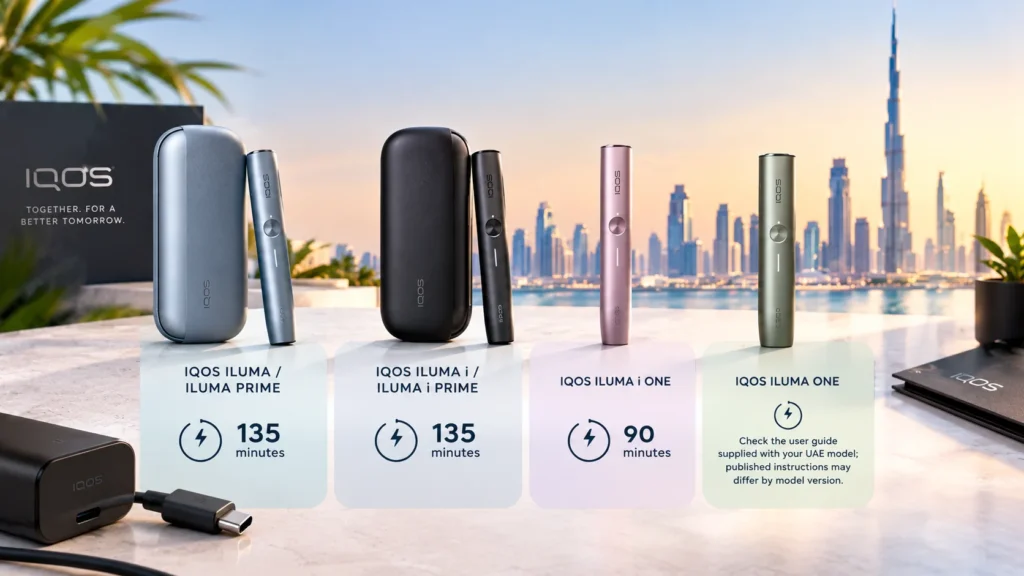
Charging time varies across the IQOS ILUMA range. The following are approximate full-charge times published in model-specific instructions:
| IQOS ILUMA model | Approximate full-charge time |
| IQOS ILUMA / ILUMA PRIME | 135 minutes |
| IQOS ILUMA i / ILUMA i PRIME | 135 minutes |
| IQOS ILUMA i ONE | 90 minutes |
| IQOS ILUMA ONE | Check the user guide supplied with your UAE model; published instructions may differ by model version |
These estimates are not guarantees. The actual time can vary depending on the battery’s starting level, temperature, charging accessories and device condition.
For models with a separate Holder and Pocket Charger, remember that they have different charging needs. The Holder recharges inside the Pocket Charger, while the Pocket Charger itself connects to a power source.
You do not need to follow unverified rules about charging for a fixed number of hours to improve battery health. Follow the manufacturer’s instructions and use the device’s status indicators to check charging progress.
4. Avoid Leaving the Battery Empty for Long Periods
If you are not going to use your device for a while, avoid leaving it completely discharged for an extended period. Recharge and store it according to the model’s instructions.
You also do not need to deliberately drain the battery to zero before recharging it. Regular, sensible charging is more useful than repeatedly allowing the battery to become completely empty.
If the device has been unused for a long time, check its charging instructions before trying to use it. A deeply discharged device may take a little time to show a status light after charging begins.
5. Keep the Charging Connection Clean and Dry
Dust, moisture or contamination around the charging port and cable connector may interfere with charging.
Before connecting the charger, check that the port and cable are dry and free from visible debris. Clean the exterior gently using an appropriate dry method recommended in the user guide. Do not insert metal objects into the port or use liquids to clean electrical connections.
If the device or charging port becomes wet, do not connect it to power until it is safe to do so under the manufacturer’s instructions.
6. Avoid Repeated Charging Problems
If your IQOS ILUMA battery is draining fast, first consider whether your usage has increased or the device is exposed to higher temperatures than usual.
Check the battery indicator before and after use. Make sure the charging cable is securely connected and that the power source works correctly. If charging is inconsistent, try a known-compatible, undamaged cable and adapter recommended for the device.
Do not repeatedly disconnect and reconnect a device that is overheating or showing signs of damage. Stop using it and seek official support if the problem continues.
7. Recognize Normal Battery Ageing
The IQOS ILUMA battery is rechargeable, but its capacity can decrease over time. You may notice that it needs charging more frequently or that the number of uses available between charges decreases.
There is no single lifespan that applies to every device. Battery ageing depends on usage, storage conditions, temperature and the individual battery’s condition.
If the battery performance has gradually declined, it may be normal ageing. If it changes suddenly, the device will not charge, or it repeatedly shuts down despite showing charge, a fault may be involved.
Do not open the device or attempt to replace its internal battery yourself. Contact official customer support for guidance.
IQOS ILUMA Battery Draining Fast: What to Check
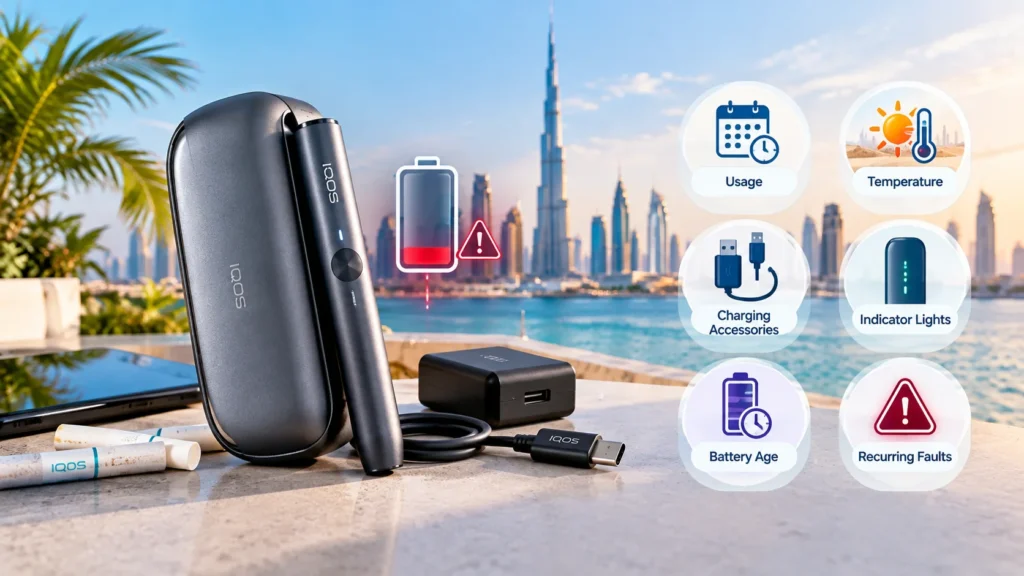
If your IQOS ILUMA battery seems to drain unusually quickly, work through these checks:
- Check your usage: More frequent sessions naturally require more charging.
- Consider the temperature: A device exposed to UAE heat may not perform as expected until it returns to the recommended operating range.
- Check the charging accessories: Use the compatible adapter and cable specified for your model.
- Observe the indicator lights: Interpret the lights using your exact model’s guide rather than relying on instructions for a different ILUMA version.
- Consider battery age: Older rechargeable batteries may hold less charge than they did when new.
- Look for recurring faults: Sudden shutdowns, repeated charging interruptions or a battery that will not charge properly may require professional assessment.
These checks can help narrow down the cause, but they cannot confirm battery health on their own.
IQOS ILUMA Charging Light Meaning
The status lights help you understand charging progress and certain device conditions. However, their meaning depends on the model.
On some ILUMA devices, white lights indicate the remaining charge, while a yellow blinking light can indicate a depleted battery or low charge. Red blinking lights or unusual flashing patterns may signal a problem that needs attention.
Do not assume one colour or flashing pattern means the same thing across IQOS ILUMA, ILUMA ONE, ILUMA i and ILUMA i ONE. Check the model-specific guide before deciding what action to take.
If the device is outside its recommended operating temperature range, allow it to return to a suitable temperature before trying again. If the warning continues, follow the troubleshooting instructions for that model.
How to Reset IQOS ILUMA if It Is Not Charging
A reset may help with certain temporary device issues, but the correct procedure depends on the model.
For standard IQOS ILUMA and models with a Pocket Charger, the official reset procedure generally involves placing the Holder in the Pocket Charger and holding the Pocket Charger button for around 10 seconds, until the status lights confirm the reset.
The IQOS ILUMA i ONE is different: its troubleshooting instructions specify holding the device’s own ON/OFF button for 10 seconds for a reset.
Do not apply one model’s reset instructions to every device. Check your user guide before proceeding. If the device remains unresponsive, becomes unusually hot, or still will not charge, stop troubleshooting and contact official support.
Frequently Asked Questions
How can I maximize IQOS ILUMA battery life?
Use the recommended charging accessories, protect the device from excessive heat, keep charging connections clean and dry, and follow the charging and storage instructions for your model. Battery capacity will still decrease naturally over time.
How long does an IQOS ILUMA battery last on a full charge?
It depends on the model, battery condition and frequency of use. Standard ILUMA Pocket Chargers are designed to provide up to around 20 experiences when fully charged, but actual performance may vary. This is not a guarantee of the same result for every device or user.
Why is my IQOS ILUMA battery draining fast?
Possible causes include frequent use, high temperatures, normal battery ageing or a charging problem. Check your usage and charging setup first. If the change is sudden or the device repeatedly shuts down, seek official support.
How long does IQOS ILUMA take to charge?
Standard IQOS ILUMA and IQOS ILUMA i Pocket Chargers take approximately 135 minutes to charge fully. IQOS ILUMA i ONE takes around 90 minutes. For IQOS ILUMA ONE, check the instructions supplied with your UAE model because published charging times can differ by version.
Should I let my IQOS ILUMA battery drain completely before charging?
No. You do not need to deliberately drain the battery to zero before recharging it. Follow the manufacturer’s charging guidance and avoid leaving the device completely discharged for an extended period.
What should I do if my IQOS ILUMA will not hold a charge?
Check the compatible charging accessories, connection and temperature first. If the battery continues to lose charge unusually quickly or the device will not charge fully, the battery may have aged or the device may have a fault. Contact official customer support instead of opening the device yourself.